Thursday, 9 May 2013

How to Insert Rows, Column and new work sheet in Microsoft Excel


How to Insert Rows, Column and new work sheet in Microsoft Excel:

As we know there are 16384 columns and 1048576 rows available in MS excel 2007/2010. But if we have prepared a list or database and after that we need row/column in between then there are options to insert rows and columns also.

Therefor we have to use Insert Option in Home Tab (Cells Group), don’t confuse with Insert Tab. Its Insert option in Home Tab. Using this option we can insert row, column, cells and even new worksheets also.

By default there are three sheets in workbook. (That default value can be changed from Excel Options)

Insert Row option provides an additional row above the mouse handle position. It does not ask for row above or below (like MS word table menus). Therefore Mouse handle position is important for this option.

Same case with Insert Column option, Excel provide additional column towards left side to Mouse handle.

Note:

1.       Adding new column is just adjustment into total available column (16384 columns). If all the 16384 columns are already filled, then excel will not insert new column. More importantly if anything entered in last column (XFD) then also excel does not insert new column.

2.       Adding new Row is just adjustment into total available row (1048576 rows). If all the 1048576 rows are already filled, then excel will not insert new row. More importantly if anything entered in last row (1048576) then also excel does not insert new row.

3.       There is no particular limit of maximum number of work sheet, it depends on memory of computer.


Wednesday, 8 May 2013

Use of Sub Total in Microsoft Excel 2007/10


Use of Sub Total in Microsoft Excel 2007/10:
Let’s consider an example to understand sub-total in Excel. Suppose we have different product in our shop /business, and we maintain record of each sell. With the help of sub-total we can calculate, analyze product wise sell and money earned by each product category sell.
Suppose we have different products on Electronics store like Tv, Washing Machine, Microwave, Refrigerator, LCD, LED. Total we sell these 6 products with different specification (like different size, capacity).
First, we just need to type product name and price.(Preparing list)
Second, we need to sort list by Product name(Item wise sorting)
Third, use of sub-total in Data menu to analyze income from different products.

Data after sub total

Wednesday, 1 May 2013

Multiple Sheet Referencing in Microsoft Excel:

We can use (refer) cell of one sheet in any calculation on another sheet. For this we just have to use following syntax:

Sheet_name!cell_name
If we have changed the sheet name (sheet rename) then we must use that name. The picture is showing total of A1 cell of sheet1(value:10), Sheet2(value:20), Sheet3(value:30) on 4th Sheet.

Saturday, 5 January 2013

Rename Excel Sheet


How to rename sheets: Excel 2010
For quick identification of sheets it is better to rename them. Otherwise sheet names are given by excel like sheet1, sheet2…etc.
There are three ways to change name of sheet:
  1. Go to Home tab à Cells group à Format Option à Rename Sheet, This will give us cursor at worksheet tab, there we can type desired sheet name.
  2. Press Right click on Worksheet tabà rename
  3. Directly pressing mouse button on Worksheet Tab , we can change the sheet name 


Friday, 4 January 2013

02-Introduction to Microsoft Excel

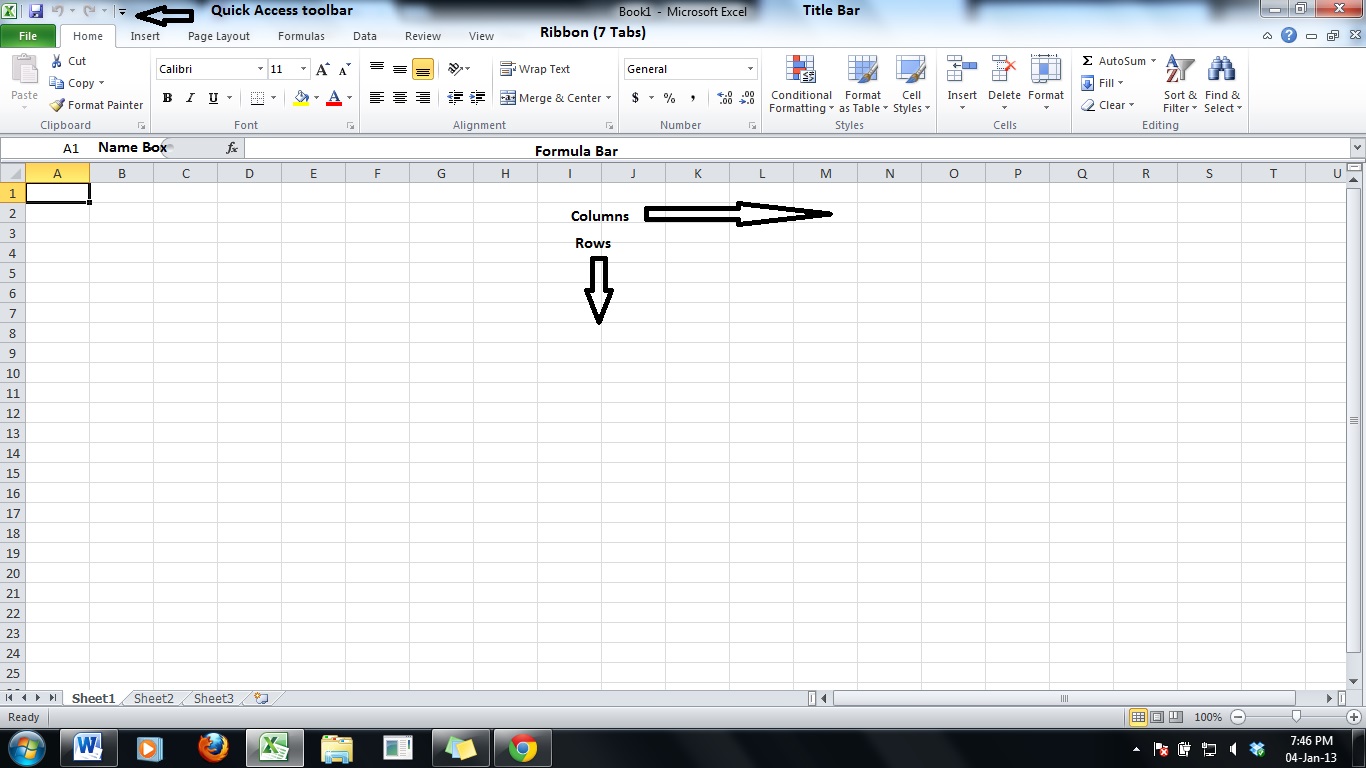
There are 7-tabs in Microsoft Excel 2007 ribbon:
1. Home
2. Insert
3. Page Layout
4. Formulas
5. Data
6. Review
7. View
And one Office Button in left-top corner. There is no menu bar now with long-vertical opening menus. Menu bar is replaced with ribbon. Ribbon contains different Tabs, these tabs contain different command groups which having options or commands.
There is one Quick Access Toolbar on the top of the ribbon (sometimes below the ribbon) which contains frequently used buttons like Undo, Redo, save, print preview etc.
In Excel 2010, there is File menu, instead of Office Button.

Thursday, 3 January 2013

01-Introduction to Microsoft Excel 2007-2010

Microsoft Excel is part of Microsoft office suit. Its a spread-sheet program. Which contains different sheets, made of rows and columns.
Microsoft Excel Contains :

  1. 16384 Columns
  2. 1048576 Rows
  3. Cells= 17179869184 ( Multiplication of rows and columns, i.e. 16384x1048576)
  4. Excel file is knows as one "Workbook" ( not as worksheet)
  5. All columns have name starting from A,B,C,D.....Z,AA,AB....AZ,BA,BB,BC...BZ....XFD(Last column)
  6. All rows have number starting from 1 to 1048576
  7. All cells have cell name or commonly known as cell address: ColumnName With Row Number, for e.g. A1, C5....D78 likewise.
  8. Extension of Excel 2007 and Excel 2010 file is *.xlsx
  9. Previously it was *.xls with Excel 97 to Excel 2003.
  10. There were 256 columns and 65536 rows in Excel 2003, and total 1677216 cells in Excel 2003.

Memory Units

Units to measure computer /disk memory size:

1 bit (1 or 0)
4 bits= 1 Nybble
8 bits= 1 byte
1024 bytes = 1 kilo Byte (KB)
1024 KB = 1 Mega Byte (MB)
1024 MB = 1 Giga Byte (GB)
1024 GB= 1 Terabyte (TB)
1024 TB= 1 Petabyte (PB)
1024 PB= 1 Exabyte (EB)